Thursday, July 23, 2015

3D Vision 2 Wireless Glasses

Discover the difference NVIDIA 3D Vision® 2 can make in your gaming experience. The new gamer-inspired glasses have 20% larger lenses to give you the most viewing area with the least light leakage. They also work great with the innovative NVIDIA 3D LightBoost™ technology, which makes your screen up to 2x brighter for better 3D gaming and video viewing. Plus, 3D Vision 2 glasses are built from state of the art, softer materials designed to deliver more comfort and better fit.

Bigger 3D
- Try new 27'' 3D monitors from ASUS and Acer for Full HD
  1080p 3D and ghost-free image quality
- Experience games more fully with 20% larger lenses for
  an ultra wide viewing area
- Get the most diverse ecosystem of content-including
  3D photo sharing and browsing-on 3DVisionLive.com

What is a Computer Network?

A computer network is a system in which multiple computers are connected to each other to share information and resources.

Characteristics of a computer network

-Share Resources from one computer to another

-Create files and store them in one computer, access those files from the other computer(s) connected over the network

-Connect a printer, scanner, or a fax machine to one computer within the network and let other computers of the network use the machines available over network.

Following is the list of hardware's required to setup a computer network.

-Network Cables
-Distributors
-Routers
-Internal Network Cards
-External Network Cards

Network Cables

Network cables are used to connect computers. The most commonly used cable is Category 5 cable RJ-45.

Distributors
A computer can be connected to another one via a serial port but if we need to connect many computers to produce a network, this serial connection will not work. The solution is to use a central body to which other computers, printers, scanners etc. can be connected and

How to set path in Java

How to set path in Java

The path is required to be set for using tools such as javac, java etc.
If you are saving the java source file inside the jdk/bin directory, path is not required to be set because all the tools will be available in the current directory.
But If you are having your java file outside the jdk/bin folder, it is necessary to set path of JDK.
There are 2 ways to set java path:
  1. temporary
  2. permanent

1) How to set Temporary Path of JDK in Windows

To set the temporary path of JDK, you need to follow following steps:
  • Open command prompt
  • copy the path of jdk/bin directory
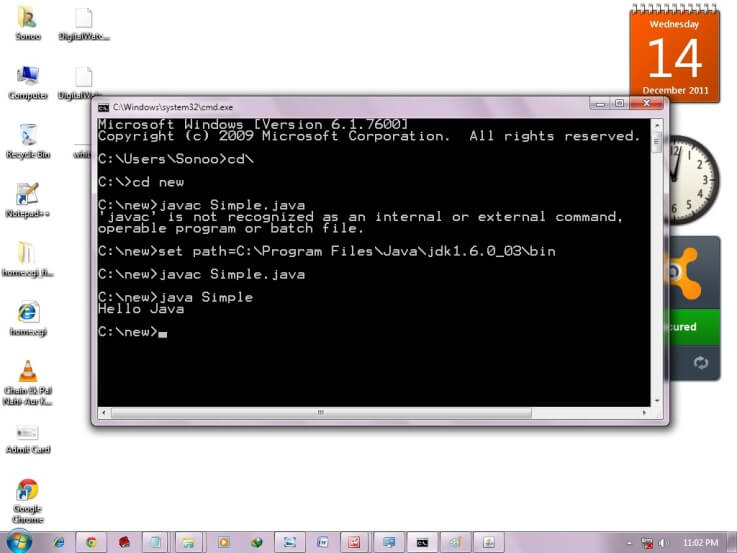
  • write in command prompt: set path=copied_path

For Example:


set path=C:\Program Files\Java\jdk1.6.0_23\bin

Let's see it in the figure given below:

how to set path in java

2) How to set Permanent Path of JDK in Windows

Unicode System

Unicode System

Unicode is a universal international standard character encoding that is capable of representing most of the world's written languages.

Why java uses Unicode System?

Before Unicode, there were many language standards:
  • ASCII (American Standard Code for Information Interchange) for the United States.
  • ISO 8859-1 for Western European Language.
  • KOI-8 for Russian.
  • GB18030 and BIG-5 for chinese, and so on.

Variable and Datatype in Java

In this page, we will learn about the variable and java data types. Variable is a name of memory location. There are three types of variables: local, instance and static. There are two types of datatypes in java, primitive and non-primitive.

Variable

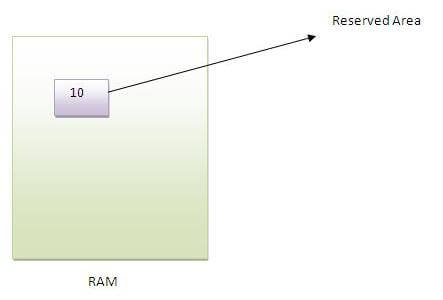
Variable is name of reserved area allocated in memory.
variable in java
int data=50;//Here data is variable  


Types of Variable


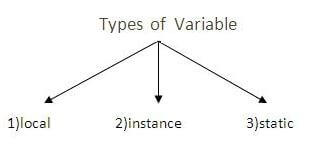
There are three types of variables in java
  • local variable
  • instance variable
  • static variable
types of variable

Local Variable

A variable that is declared inside the method is called local variable.

Random Access Memory (RAM)

Alternatively referred to as main memory, primary memory, or system memory,Random Access Memory (RAM) is a hardware device that allows information to be stored and retrieved on a computer. RAM is usually associated with DRAM, which is a type of memory module. Because information is accessed randomly instead of sequentially like it is on a CD or hard drive, the computer can access the data much faster. However, unlike ROM or a the hard drive, RAM is a volatile memory and requires power to keep the data accessible; if power is lost all data contained in memory lo

Computer DIMM or dual-inline memory module


Additional information


As the computer boots, parts of the operating system and drivers are loaded into memory, which allows the CPU to process the instructions faster and speeds up the boot process. After the operating system has loaded, each program you open, such as thebrowser you're
using to view this page, is loaded into memory while it is running. If too many programs are open the computer will swap the data in the memory between the RAM and the hard disk drive.
Over the evolution of the computer there have been different variations of RAM. Some of the more common examples are DIMM, RIMM, SIMM, SO-DIMM, and SOO-RIMM. Below is an example image of a 512MB DIMM computer memory module, a typical piece of RAM found in desktop computers. This memory module would be installed into one of thememory slots on a motherboard.
Tip: New users often confuse RAM with disk drive space. See our memory definition for a comparison between memory and storage.

Four types of Motherboards

Today our class is about motherboard types and differences. we already discussed about motherboard, which is the main circuit board and it interconnects the remaining parts of computer.